Dedunu

  • Technology
  • Travel
  • How to blink Raspberry Pi Pico onboard LED?

    Original documentation for Raspberry Pi documentation shows turning on LED this code.

    from machine import Pin, Timer
    led = Pin(25, Pin.OUT)
    timer = Timer()
    
    def blink(timer):
        led.toggle()
    
    timer.init(freq=2.5, mode=Timer.PERIODIC, callback=blink)
    

    Above code doesn’t work. It should be changed to this.

    from machine import Pin, Timer
    led = machine.Pin("LED", machine.Pin.OUT)
    timer = Timer()
    
    def blink(timer):
        led.toggle()
    
    timer.init(freq=2.5, mode=Timer.PERIODIC, callback=blink)
    

    https://projects.raspberrypi.org/en/projects/getting-started-with-the-pico/5

  • Psycopg causing issues without autocommit

    We use psycopg2 package to write ad-hoc jobs in Python. But this can lead to serious problem in production environments.

    I have seen this couple of times in the last five years. When we write adhoc Python scripts using Psycopg2 without autocommit=True, you may see wierd spikes on your idle on transaction like below. This was a batch job. It was running every 10 seconds. If your batch job is not closing connections or restarting from the scratch, your SELECT queries might see very old versions of the data. We have to be very careful with this. As it can cause data loss too.

    Line graph showing the max time idle in transaction (seconds) over a time period from 08:00 to 12:00, with fluctuations between 0 to 10 seconds.

    I also have seen idle_in_transaction_max_time goes to days in one instance too. That will stop auto-vaccuum doing its work. It will cause a lot of issues and slow down your database. When you use Psycopg, Make sure you have autocommit=True or you commit manually. You can see the warning on the documentation too.

    Illustration explaining the `autocommit` attribute in the `psycopg2` package for Python, detailing read/write behavior, transaction management, and associated warnings.

    https://www.psycopg.org/docs/connection.html#connection.commit

  • Python 3.11 dis tests

    I recently found out about dis module in Python. I wrote two simple functions.

    def function_1(x, y):
      x + y
    
    
    def function_2(x, y);
      return x + y
    

    I used dis module to find out about the bytecode operations for each function.

    from dis import dis
    
    print("="*60)
    dis(function_1)
    print("="*60)
    dis(function_2)
    print("="*60)
    

    I thought the first function would have fewer bytecode operations. But this is the output I got from the dis module.

    ============================================================
      5           0 RESUME                   0
    
      6           2 LOAD_FAST                0 (y)
                  4 LOAD_FAST                1 (z)
                  6 BINARY_OP                0 (+)
                 10 POP_TOP
                 12 LOAD_CONST               0 (None)
                 14 RETURN_VALUE
    ============================================================
      9           0 RESUME                   0
    
     10           2 LOAD_FAST                0 (y)
                  4 LOAD_FAST                1 (z)
                  6 BINARY_OP                0 (+)
                 10 RETURN_VALUE
    ============================================================
    

    Turns out the first function has more bytecode operations. It loads the None value and return it. I wanted to run some tests around the running time. I ran the function for thousands of times and recorded the running time.

    Line graph depicting the execution time difference between two Python functions over multiple runs, showing fluctuations around the zero difference point.
    Graph showing execution time difference between two Python functions, with the x-axis representing the number of iterations and the y-axis displaying time differences.

    Above two figures shows the difference between function_1 and function_2 execution time on an AMD Dual core processors. I was hoping to see more clear evidence, I thought function_2 would be slightly faster. X axis shows number of times I ran the functions in a loop. Y axis shows the difference in time (function_1 time – function_2 time).

    Graph showing execution time differences between function_1 and function_2 in Python, with X-axis representing the number of function calls and Y-axis representing the time difference.
    Line chart showing variations in execution time difference between two Python functions across multiple runs.

    Above two charts shows the same test on an Intel chip. I don’t see any clear evidence.

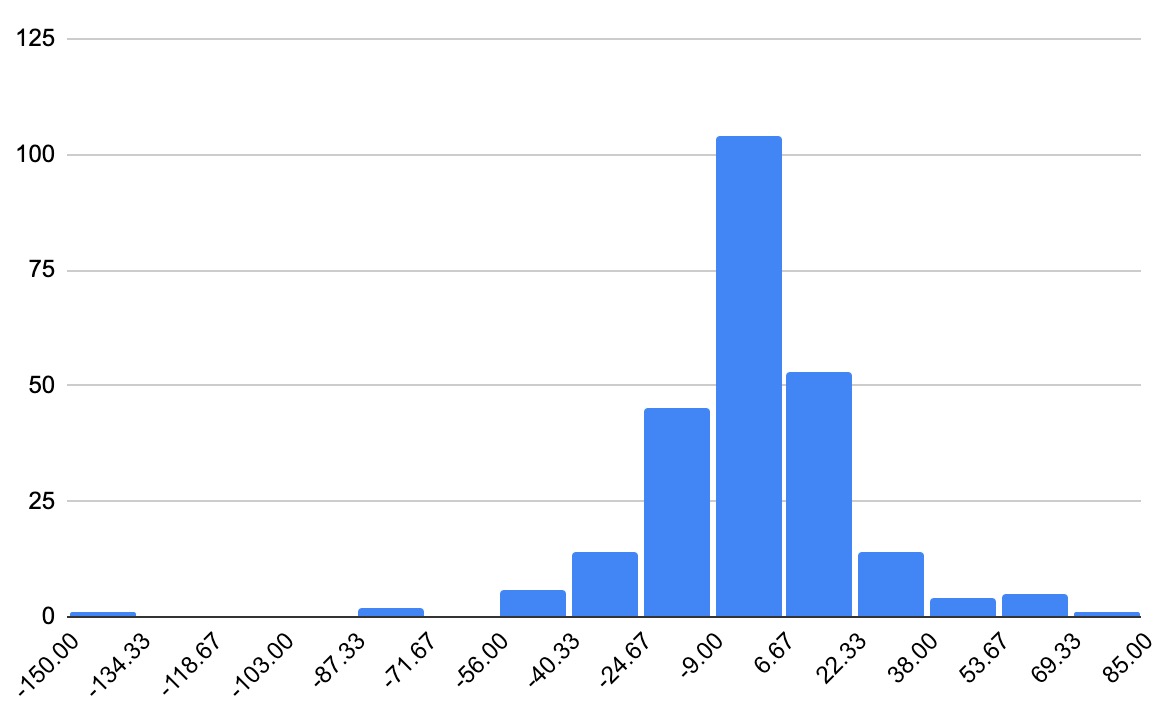
    Histogram showing execution time differences between two Python functions, with the x-axis representing time differences and the y-axis representing frequency.

    I ran the same number of functions calls for 250 times and got this variation in differences. I am still not sure about the results. I will investigate this further.

  • Hisense TV says File Format Not Supported

    I bought a Hisense TV recently. I used it to watch a couple of downloaded movies. After a couple of weeks, the same files stopped working. TV showed an error message. I tried to find help online. It was not that helpful. I found out that clearing the cache fixed the issue.

    How to clear cache?

    1. Open the settings menu.
    2. Select Settings option.
    3. Select System option.
    4. Select Application Settings option.
    5. Select Clear Cache.
    6. Select and press “Clear” button.

    The TV will restart after that.

  • Private S3 bucket and CloudFront with Terraform

    I wanted to setup a CDN for my travel blog. I followed couple of resources and came up with this setup.

    terraform.tf

    terraform {
      required_providers {
        aws = {
          source  = "hashicorp/aws"
          version = "5.8.0"
        }
      }
    }
    

    variables.tf

    variable "cdn1_domain_name" {
      default = "cdn1.dedunu.click"
    }
    
    variable "root_domain_name" {
      default = "dedunu.click"
    }
    

    provider.tf

    provider "aws" {
      region = "us-east-1"
    }
    

    data.tf

    data "aws_route53_zone" "default" {
      name = "dedunu.click"
    }
    

    s3.tf

    resource "aws_s3_bucket" "default" {
      bucket = var.cdn1_domain_name
    }
    
    resource "aws_s3_bucket_website_configuration" "default" {
      bucket = aws_s3_bucket.default.id
    
      index_document {
        suffix = "index.html"
      }
    
      error_document {
        key = "index.html"
      }
    }
    
    resource "aws_s3_bucket_ownership_controls" "default" {
      bucket = aws_s3_bucket.default.id
      rule {
        object_ownership = "BucketOwnerPreferred"
      }
    }
    
    resource "aws_s3_bucket_public_access_block" "default" {
      bucket = aws_s3_bucket.default.id
    
      block_public_acls       = true
      block_public_policy     = true
      ignore_public_acls      = true
      restrict_public_buckets = true
    }
    
    resource "aws_s3_bucket_acl" "default" {
      depends_on = [
        aws_s3_bucket_ownership_controls.default,
        aws_s3_bucket_public_access_block.default,
      ]
    
      bucket = aws_s3_bucket.default.id
      acl    = "private"
    }
    
    resource "aws_s3_bucket_policy" "default" {
      bucket = aws_s3_bucket.default.id
      policy = data.aws_iam_policy_document.default.json
    }
    
    data "aws_iam_policy_document" "default" {
      statement {
        sid = "1"
    
        principals {
          type        = "Service"
          identifiers = ["cloudfront.amazonaws.com"]
        }
    
        actions = [
          "s3:GetObject",
        ]
    
        resources = [
          "arn:aws:s3:::${var.cdn1_domain_name}/*"
        ]
    
        condition {
          test     = "StringEquals"
          variable = "AWS:SourceArn"
          values = [
            aws_cloudfront_distribution.default.arn
          ]
        }
      }
    
    }
    

    cloudfront.tf

    resource "aws_cloudfront_distribution" "default" {
    
      origin {
        domain_name              = aws_s3_bucket.default.bucket_regional_domain_name
        origin_id                = var.cdn1_domain_name
        origin_access_control_id = aws_cloudfront_origin_access_control.default.id
      }
    
      enabled             = true
      default_root_object = "index.html"
    
      default_cache_behavior {
        viewer_protocol_policy = "redirect-to-https"
        compress               = true
        allowed_methods        = ["GET", "HEAD"]
        cached_methods         = ["GET", "HEAD"]
        target_origin_id       = var.cdn1_domain_name
        min_ttl                = 0
        default_ttl            = 86400
        max_ttl                = 31536000
    
        forwarded_values {
          query_string = false
          cookies {
            forward = "none"
          }
        }
      }
    
      aliases = ["${var.cdn1_domain_name}"]
    
      restrictions {
        geo_restriction {
          restriction_type = "none"
        }
      }
    
      viewer_certificate {
        acm_certificate_arn = aws_acm_certificate.default.arn
        ssl_support_method  = "sni-only"
      }
    }
    
    resource "aws_cloudfront_origin_access_control" "default" {
      name                              = "cdn1_dedunu_click_oac"
      origin_access_control_origin_type = "s3"
      signing_behavior                  = "always"
      signing_protocol                  = "sigv4"
    }
    

    acm.tf

    resource "aws_acm_certificate" "default" {
      domain_name               = "*.${var.root_domain_name}"
      validation_method         = "EMAIL"
      subject_alternative_names = ["${var.root_domain_name}"]
    }
    

    route53.tf

    resource "aws_route53_record" "default" {
      zone_id = data.aws_route53_zone.default.zone_id
      name    = var.cdn1_domain_name
      type    = "A"
    
      alias {
        name                   = aws_cloudfront_distribution.default.domain_name
        zone_id                = aws_cloudfront_distribution.default.hosted_zone_id
        evaluate_target_health = false
      }
    }
    

    Finally I synced files with this command.

    aws s3 sync . s3://cdn1.dedunu.click
    

    Sources:

    • https://medium.com/runatlantis/hosting-our-static-site-over-ssl-with-s3-acm-cloudfront-and-terraform-513b799aec0f
    • https://awstip.com/aws-cloudfront-with-s3-as-origin-using-terraform-a369cdadc541

  • Send emails with SendGrid with Python 3

    I wanted to send emails with Twillio SendGrid. It offers a generous free tier. Set up the domain and authenticate the identity. You have to generate an API key with “Mail Send” privileges.

    Set up your environment variables. My script will pick up credentials from the environment variables.

    export SMTP_USER="apikey"
    export SMTP_PASSWORD="<replace_the_api_key>"
    export SMTP_SERVER="smtp.sendgrid.net"
    export SMTP_PORT=465
    

    This snippet only uses Python standard libraries.

    import os
    import smtplib
    from email.message import EmailMessage
    
    
    def send_mail(
        subject,
        body,
        from_address,
        to_address,
        cc_address=[],
        file_list=[],
        message_id="",
    ):
    
        msg = EmailMessage()
        msg["Subject"] = subject
        msg["From"] = from_address
        msg["To"] = to_address
    
        if cc_address != []:
            msg["Cc"] = cc_address
    
        if message_id != "":
            msg["In-Reply-To"] = message_id
            msg["References"] = message_id
    
        msg["Bcc"] = from_address
        msg.set_content(body)
    
        for file_path in file_list:
            with open(file_path, "rb") as file_reader:
                file_data = file_reader.read()
            msg.add_attachment(
                file_data,
                maintype="application",
                subtype="octet-stream",
                filename=os.path.basename(file_path),
            )
    
        smtp_user = os.environ.get("SMTP_USER")
        smtp_password = os.environ.get("SMTP_PASSWORD")
        smtp_server = os.environ.get("SMTP_SERVER")
        smtp_port = os.environ.get("SMTP_PORT")
    
        with smtplib.SMTP_SSL(smtp_server, smtp_port) as server:
            server.login(smtp_user, smtp_password)
            server.send_message(msg)
    

    Now we can simply send an email like this.

    from email.utils import formataddr
    
    send_mail(
        subject="Planet Express order status",
        body="We have to deliver a package!",
        from_address= formataddr(('Fry', 'fry@futurama.com')),
        to_address=[formataddr(('Leela', 'leela@futurama.com'))]
    )
    
  • New blog format

    I am going to try out a new blog format. I have tried to use WordPress, Blogger, and Github pages for my blog. One way or the other, I faced issues with every platform I tried.

    I am going to use this repository to keep notes of my tests and see how it goes.

  • Travel Checklist

    I didn’t trave that often in last two years. I have forgotten my checklist which was on top of my mind. I wrote it down to reuse it.

    You can download my travel checklist here

  • Invesment Resources

    Books

    • Learn to Earn: A Beginner’s Guide to the Basics of Investing and Business by Peter Lynch, John Rothchild
    • Common Stocks and Uncommon Profits and Other Writings by Philip A. Fisher, Kenneth L. Fisher
    • One Up On Wall Street: How to Use What You Already Know to Make Money in the Market by Peter Lynch, John Rothchild
    • The Psychology of Money by Morgan Housel
    • Panic, Prosperity, and Progress: Five Centuries of History and the Markets by Timothy Knight
    • The Intelligent Investor by Benjamin Graham
    • The Gone Fishin’ Portfolio: Get Wise, Get Wealthy–And Get on with Your Life by Alexander Green, Bill O’Reilly

    YouTube Playlists

    • Investment and Portfolio Management
    • Understanding Markets
    • Making sense of company earnings
    • Tax Planing
    • Invest at every age

    Takeaways

    • Don’t loose money.
    • Keep learning!
    • Keep your transaction costs low.
    • Keep taxes low.
    • Don’t buy anything you don’t understand. (Options/futures/companies)
    • Happy Investing!

  • Article of Association Template for Sri Lankan Private Limited Companies

    Recently, I registered a private limited company in Sri Lanka. My experience was surprisingly smooth. I could do all the paperwork online. Almost all the documents are generated via the online system called EROC. Payments can be done by cards too.

    They have given a detailed guide too. But drafting the article of association wasn’t that straightforward. Some guidelines can be found here.

    I prepared a template for anyone else to use. It can be downloaded from here

    Make sure you leave enough free space on the first page of the article of association, officers want to add few lines of system-generated information. Maximum file size allowed is 4MB.

←Previous Page
1 2 3 4 5 … 17
Next Page→
 

Loading Comments...