Dedunu

  • Technology
  • Travel
  • Live Writer and T-SQL

    Today I wanted to paste a few statements on Live Writer which were coded on SQL Server Management Studio 2012. But when I paste the code into Live Writer I got disappointed about the look. Codes were awesome on SMSS 2012 with colours. Then I wanted to find a way to insert those code with Visual Studio formatting. I found a few plugins but they were not cool. Then I found this blog.

    nn

    http://blog.hoegaerden.be/2010/01/15/windows-live-writer-paste-code-plug-in/

    nn

    He had found a nice plugin. I downloaded that and Installed that. Now I use that. It is a cool plugin. Here’s the link for that plugin.

    nn

    http://plugins.live.com/writer/detail/paste-from-visual-studio

    nn

    Tags

    nn

      n

    • Blog
    • n

    • Visual Studio
    • n

    • Blogging
    • n

    • T-SQL
    • n

    • Live Writer
    • n

    • Code Formating
    • n

    • SQL Server
    • n

    • Code
    • n

    n

  • Insert in T-SQL

    I’m still a beginner in SQL Server. I will blog about many basic things in SQL Server. Inserting is very important Data Manipulation Statement. So let’s see how to use INSERT Statement in different ways.

    nn

    USE tempdbnGOnn--Creating TablenCREATE TABLE tmpTable(n    [id] int NOT NULL,n    [name] varchar(100) NULL,n    [address] varchar(1000) NULLn)nGOnn--Inserting DatanINSERT INTO tmpTable([id],[name],[address]) VALUES(1, 'John', '123, qwerty')nGOnn--Inserting Data by Changing order columnnINSERT INTO tmpTable([name],[id],[address]) VALUES('Mark',2, '234, qwerty')nGOnn--Inserting Data without specifying columnsnINSERT INTO tmpTable VALUES(3,'Steve', '454, qwerty')nGOnn--Deleting temp tablenDROP TABLE tmpTablenGOn

    nn

    Above statements are the basic inserting methods. But it’s recommended to specify columns. If you want to change the schema structure later It will not affect your code if you have used INSERT with specified columns. And if you don’t specify columns be careful because you have to provide data for every column.

    nn

    USE tempdbnGOnn--Creating TablenCREATE TABLE tmpTable(n    [id] int NOT NULL,n    [name] varchar(100) NULL,n    [address] varchar(1000) NULLn)nGOnn/*n    If you don't specify column names you have to n    insert data to every columns you can't skipn    columnsn*/nn-- This cause a error 'Column name or number of supplied values n-- does not match table definition.'nINSERT INTO tmpTable VALUES(4,'Gates' )nGOnn--Dropping the temp tablenDROP TABLE tmpTablenGOn

    nn

    Playing with DEFAULT Values

    nn

    Sometimes we need to work with DEFAULT values. Then if you want to let SQL Server decide values you can code like this.

    nn

    USE tempdbnGOnn--Creating TablenCREATE TABLE tmpTable(n    [name] varchar(100) DEFAULT ('Name'),n    [address] varchar(1000) DEFAULT ('Address')n)nGOnn--You can let sql server to add default values by mentioning default nINSERT INTO tmpTable VALUES('John',default )nGOnnINSERT INTO tmpTable VALUES(default,'123 qwerty')nGOnn--If you like you can give default values to all the columns too.nINSERT INTO tmpTable VALUES(default,default)nGOnn-- You can ignore values for that column. Then you have to n-- specify column namenINSERT INTO tmpTable([name]) VALUES('Mark')nGOnn--Retrieving datanSELECT * FROM tmpTablenGOnn--Dropping the temp tablenDROP TABLE tmpTablenGOn

    nn

    Inserting data from another table

    nn

    In some cases, we need to insert data from one table to another. Then we can use the INSERT statement to copy data from another table.

    nn

    USE [AdventureWorks2012]nGOnn--Creating a temp tablenCREATE TABLE Tmp(n    [BusinessEntityID] [int] NOT NULL,n    [LoginID] [nvarchar](256) NOT NULL,n    [OrganizationNode] [hierarchyid] NULL,n    [JobTitle] [nvarchar](50) NOT NULL,n    [BirthDate] [date] NOT NULL,n    [MaritalStatus] [nchar](1) NOT NULL,n    [Gender] [nchar](1) NOT NULL,n)nGOnn--Inserting data from another tablenINSERT INTO Tmpn    (n        [BusinessEntityID],    n        [LoginID],n        [OrganizationNode],n        [JobTitle],n        [BirthDate],n        [MaritalStatus],n        [Gender]    n    ) n    --Selecting data from HumanResources.Employeen    SELECT n        [BusinessEntityID],n        [LoginID],n        [OrganizationNode],n        [JobTitle],n        [BirthDate],n        [MaritalStatus],n        [Gender]n    FROM HumanResources.EmployeenGOnn--Retrieving datanSELECT * FROM TmpnGOnn--Dropping TablenDROP TABLE TmpnGOn

    nn

    Tags

    nn

      n

    • Insert
    • n

    • T-SQL
    • n

    • SQL Server
    • n

    n

  • Delete using another Table

    In this example, I create a temp table on AdventureWorks2012 Database, and first I load all the data in HumanResources.Employee to the temporary table. Then I delete data using HumanResources.Employee. This command will delete all the records in Tmp which has Gender = ‘M’ in HumanResources.Employee table.

    nn

    USE [AdventureWorks2012]nGOnn--Inserting data from HumanResources.Employee and Person.Person to non existing tablenSELECT  *n    INTO Tmpn    FROM [HumanResources].[Employee] nGOnn--DELETE Using another tablenDELETE Tmp n    FROM [HumanResources].[Employee] AS HE, Tmpn    WHERE Tmp.BusinessEntityID = HE.BusinessEntityIDn    AND HE.Gender = 'M'nn--Retrieving datanSELECT * FROM TmpnGOnn--Dropping TablenDROP TABLE TmpnGOn

    nn

    You can use an inner or outer join to combine those data.

    nn

    USE [AdventureWorks2012]nGOnn--Inserting data from HumanResources.Employee and Person.Person to non existing tablenSELECT  *n    INTO Tmpn    FROM [HumanResources].[Employee] nGOnn--DELETE Using another tablenDELETE Tmp n    FROM [HumanResources].[Employee] AS HEn    INNER JOIN Tmpn    ON Tmp.BusinessEntityID = HE.BusinessEntityIDn    WHERE HE.Gender = 'M'nn--Retrieving datanSELECT * FROM TmpnGOnn--Dropping TablenDROP TABLE TmpnGOn

    nn

    Tags

    nn

      n

    • SQL
    • n

    • DELETE
    • n

    • T-SQL
    • n

    • TSQL
    • n

    • SQL Server
    • n

    n

  • Are you fed up with Outlook Express

    As usual most of us are using web-based emails such as Yahoo, G mail or Hotmail. Almost no one uses email client software like Outlook Express or Outlook. Every time we click on an email link it opens Outlook and ask us to configure the email account.

    nn

    If you are using FireFox we can say bye to our email client software.

    nn

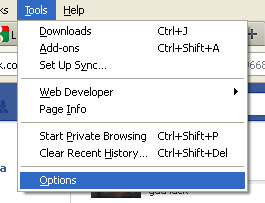
    Get options dialog box from Firefox Tools -> Options for Windows XP.

    nn

    option_dialog

    nn

    Then Click on the Application tab.

    nn

    option

    nn

    Then find “mailto”. You can see the drop down box in front of it. Change it to Use Gmail or Use Yahoo. If you are not using Gmail or Yahoo you can configure your web-based email client.

    nn

    Tags

    nn

      n

    • Gmail
    • n

    • Outlook
    • n

    • Yahoo Mail
    • n

    • Outlook Express
    • n

    n

  • How to visit government blocked sites

    Important! This post was written a long time ago. Right now the easiest way to access sites blocked by the regulator is Tor Browser. Download the Tor browser here.

    <REMOVED>

←Previous Page
1 … 15 16 17
 

Loading Comments...